Management software for service businesses
Manage each job from quote to delivery
Keep work orders, quotes, deposits and updates in one place. Customers can approve a quote, upload proof of a deposit and check progress through a link or QR code, without installing an app or creating an account.
- No app for customers to install
- Access by link or QR code
- 14-day free trial
 OrdenTip
Manage a work order for free without signing up
Open the workspace with sample data. Explore work orders, prepare quotes and try the workshop board. Create a quick order or use the detailed intake form.
No payment method required
Read the step-by-step walkthrough in EnglishOrden IA · Built-in assistance
Prepare work orders and ask about your business with Orden IA
The assistant uses your business records to help you enter orders, answer everyday questions and find your way around OrdenTip.
Using Orden IA day to day
From request to draft
Describe the job. Orden IA looks for matching customers and catalog items to draft a new order or suggest line items for a quote.
Ask about your business in plain English
Ask “How is my business doing?” or “How much is still outstanding?” You can also look up an order using the information in your account.
Help where you need it
Get answers and suggestions for the screen or order you’re looking at, without leaving the application.
You review and confirm. Check the customer, items, quantities and prices before creating the order or adding items to the quote.
Try OrdenTipPrepare a work order for Ana López to inspect her printer and include a cleaning service.
Summary for review
- Customer
- Ana López
- Job
- Inspect printer
- Catalog item
- Cleaning · 1 service
Review the matches and fill in any missing details.
Open details Once you confirm, the order is created with a draft quote. Open the order to review and publish it.How is my business doing? What should I check first?
Your business at a glance
- Active orders
- 8 jobs in progress
- Registered customers
- 24 customers
- Orders with an outstanding balance
- 3 orders to review
I’d start with the orders that have an outstanding balance so you can plan your next collections.
Go to orders The summary uses your account records. This example uses fictional data.When does AI save you time?
A quote with six materials sold in two different units is worth trying with Orden IA. For a routine collection notice, fill in a saved template and compare how long it takes.
Measure time saved over a weekTools you can use alongside OrdenTip
Draft a diagnosis update with Gemini, make an intake sign in Canva or compare job times in a spreadsheet. The guide includes sample prompts and shows what to check in each result.
Explore the three tools and their examplesLess manual follow-up
What you need to manage each job
Record the request, prepare the quote, assign a team member and track progress through delivery. The work order keeps the details together.
At the center of your workflow
Work orders
Record the customer, request and intake details. Assign a team member, set a priority and check dates and status from the same order.
Quotes and amendments
Itemize products, services, terms and deposits. If the scope changes, add an amendment and keep the original approval on record.
Customer QR codes
Give each customer a unique QR code to review, accept or decline their quote and track progress without an account.
What needs to happen next
See the next action for each order, whether it is waiting for a reply, confirming a deposit, continuing the job or completing delivery.
Deposits and payments
Customers upload proof of a deposit from their order link. Review the proof and confirm the payment to update the balance.
Electronic invoicing with ARCA
Issue invoices and credit notes from work orders and counter sales. This feature is available exclusively to Argentine accounts.
Stages that match your workflow
Define each stage and which transitions your team can make. Follow the orders on your board.
-
ReceivedJob recorded
-
QuotedQuote prepared
-
In progressWork underway
Documents and files
Keep the intake receipt, photos, diagnosis, quote and supporting documents in the same order.
Team, catalog and transactions
Assign team members, reuse catalog products and services, and review business income and expenses.
OrdenTip in English and Spanish
Switch the app’s language whenever you need to. Dates and amounts follow the language you select.
Connected operations
From request to payment and from purchase to inventory
Alongside job tracking, OrdenTip brings together the records you need to see what you sold, what’s in stock, what customers owe and what you owe suppliers.
Sales and customers
Counter sales and accounts receivable
Record a walk-in sale or bill a customer, combine payment methods and keep track of outstanding balances.
- Full, partial or split payments
- Apply one payment to several orders or sales
- Download a PDF statement for a selected period
Catalog and inventory
Products, services and stock on hand
Reuse prices and categories, track the products that need inventory control and see what caused each stock movement.
- Current, minimum and opening stock
- Record a reason for adjustments and counts
- Stock used by sales and work orders
Purchasing
Purchase orders and staged deliveries
Create a purchase order and record what actually arrived, keeping the supplier order separate from the goods received.
- Partial or full receipts
- Automatic updates to inventory
- Purchase orders and goods receipts in PDF
Suppliers
Invoices, payments and accounts payable
Record invoices and payments, check due dates and see how much you owe each supplier.
- Outstanding balances and overdue amounts
- Individual or consolidated payments
- Download a PDF statement for a selected period
Day-to-day finances
Income, expenses and cash register
Review transactions and track each register shift from opening through cash count and closing.
- One transaction ledger
- Expected cash and closing difference
- Breakdown by other payment methods
Administration
Team, imports and settings
Choose who can access each area, validate data before importing it and configure currency, taxes, terms and workflows.
- Roles, invitations and assignments
- Import customers and catalog items from CSV
- Country and industry settings
From intake to delivery
A workflow your team and customers can follow
Receive the job
Record what came in, who the customer is and what they need.
Assess the job and prepare a quote
Set the scope, line items, price, terms and estimated delivery.
Get a clear decision
The customer scans the QR code, reviews the quote and responds.
Complete and close the job
Update progress, record payments and keep the order history.
Working with OrdenTip
See where each job stands and what happens next
Check the stage, assignee, quote and payments. Your team works from the same order and customers see the information you share.
Work order board
See each job’s current stage
Find orders by stage or assignee, set priorities and move work through your configured stages.
- Stages that fit your workflow.
- Visible priorities and assignments.
- Separate active and void orders.
Basic details recorded.
Awaiting the customer’s response.
Work is underway.
Order details
Know the next step
See whether the next step is approval, checking a deposit or continuing the job. Quotes, payments, files and history stay with the order.
- Approved quote and subsequent changes.
- Intake details, diagnoses and documents.
- History of decisions and transactions.
Installation and commissioning
Sample customer · Delivery agreed
- 1ReceivedCompleted
- 2Under reviewCompleted
- 3QuotedUnderway
- 4In progressNext
Customer access
Customers see the quote and track progress
Share the link or QR code so customers can review their quote, respond and check progress. They see what you share without installing an app or creating an account.
- Track the stages you make visible.
- Accept or decline a quote.
- Access shared documents and receipts.
Track order #0146
Installation and commissioning.
A simpler experience for your customers
Customers approve quotes and upload proof of payment from one link
Share the order link or QR code. The customer reviews the quote and accepts or declines it. If you request a deposit, they can upload proof after approval for you to review and confirm.
- No app, username or password required.
- View the quote and current amendments.
- Proof of deposit stays with the order.
- Check shared documents and job progress.
OrdenTipOutdoor signage
Industries you can manage
For service businesses
Organize requests, quotes and deliveries for repairs, installation, maintenance, print production and custom work.
 01
Repair services
Manage intake, diagnosis and quotes for electronics, computers, appliances and tools.
Phone repair intake form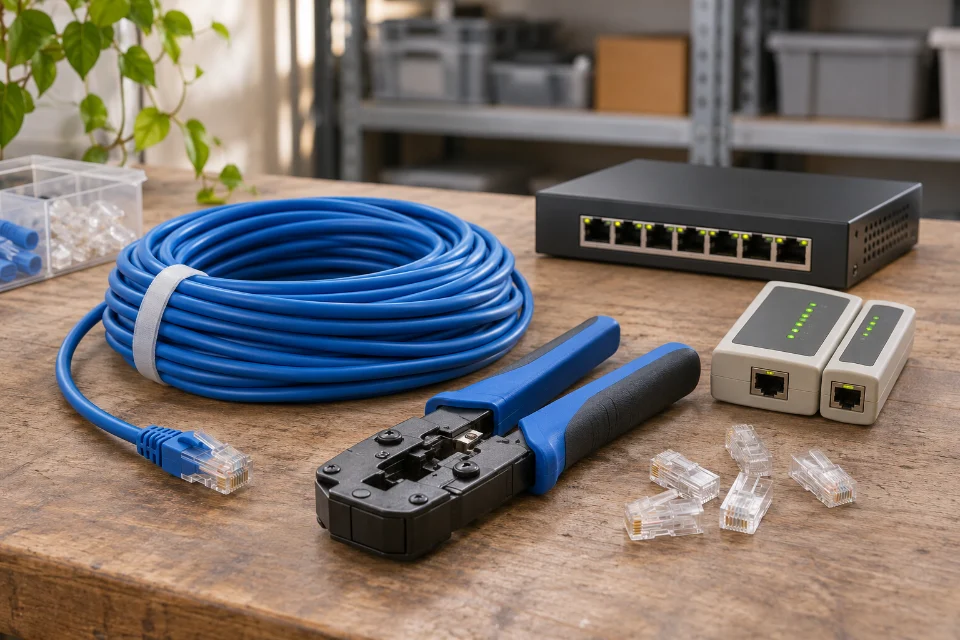 02
Installation and maintenance
Plan site visits, define scope and materials, assign the team and track work to completion.
What to take to a network installation 03
Print production
Manage signage and print jobs, record changes and extras, and track quote approval and delivery dates.
How to prepare a print-ready PDF 04
Custom work
Quote cabinetry, furniture and made-to-order manufacturing. Record approved changes and track each delivery.
How to quote for custom furnitureAccount security
Who can view and change a work order
Your shop holds phone numbers, device photos and quotes. An open session can expose those details, and an account with editing rights can change the price a customer receives. Choose how each person signs in and what information you share by link.
Why access security matters and what is at stake- Authenticator app
- Enter the temporary code from the app on your phone when OrdenTip asks you to verify your login. How to set up two-factor authentication
- Hardware security key or passkey
- Register a security key or use your device authenticator, such as Windows Hello. Your browser guides you through verification with a supported method.
- If you lose your device
- A single-use recovery code lets you register a new factor. Keep the codes somewhere you can reach even if you lose your phone or security key. How to recover access
Available plans
Choose a plan for your team size and order volume
OrdenTip is available to businesses in Argentina and other countries.
Starter
$14.900 ARS / month
For one person organizing their daily work.
- 1 user
- Up to 150 orders per month
- Work orders, board and tracking
- Quotes by QR code and link
- WhatsApp support included
Business
$24.900 ARS / month
For reception, office staff and technicians working together.
- Up to 5 users
- Up to 500 orders per month
- Roles and assignments
- Team collaboration
- WhatsApp support included
Professional
$39.900 ARS / month
For higher-volume operations that need more oversight.
- Up to 12 users
- Up to 1,500 orders per month
- Higher order capacity
- Priority WhatsApp support
Argentina: prices in ARS. Your 14-day trial starts when you create your first order. No payment method is required.
Frequently asked questions
Before you start
How do I protect access to my OrdenTip account?
In Account security, enable two-factor authentication with an authenticator app, a security key or Windows Hello. Save your recovery codes when you set up your first factor. Set up account access and share an order securely.
How does the 14-day trial work?
Create your account and start setting up your business. The trial begins when you create your first order. No payment method is required.
Do customers need to install an app?
No. Scanning the QR code opens the order in a browser. You can also share it as a link. No account is required.
Can I adapt the stages to my business?
Yes. Enable and reorder intermediate stages to match the way your team works.
What can I do with Orden IA?
Describe a job to draft a work order using your customers and catalog items, prepare quote lines, ask about your business or get help using OrdenTip. Review matches and fill in missing details before confirming. The new order includes a draft quote. You decide when to publish and send it.
Does it include sales, inventory and purchasing?
Yes. Record counter sales, track stock levels and minimums, create purchase orders and receive goods in stages. Sales, work orders and goods receipts create stock movements and preserve their history.
Can I manage customer and supplier balances?
Yes. Customer accounts group orders, sales, payments received and balances. Supplier accounts group invoices, payments and due dates. Apply one payment to several documents and download either type of statement as a PDF for your selected period.
Which documents can I download?
Download intake receipts, diagnoses, quotes, amendments, payment and completion records, sales receipts, purchase orders, goods receipts and account statements. You can also attach supplier invoices and supporting documents.
Can I issue electronic invoices with ARCA?
Yes, for Argentine accounts with the tax integration enabled. Issue invoices and credit notes from work orders or counter sales. Tax invoicing is separate from voiding a sale or recording physical stock movements.
How does support work?
Orden IA answers questions and offers suggestions inside the application. All plans also include WhatsApp support. Conversations may begin with automated assistance and continue with a support agent when needed.
Which industries is it designed for?
Repair shops, installers, maintenance teams, print shops and custom manufacturers that manage requests, quotes and deliveries.
Which currency are plans priced in?
Plans are priced in Argentine pesos for Argentina and in US dollars for other countries. You can change your location before signing up.
Does it replace accounting software?
No. OrdenTip records operations, commercial documents, collections, payments and stock movements. Accounting, tax filing and bank reconciliation remain separate.
Ready to organize your jobs and keep track of each one?
Create an account to try OrdenTip or get in touch if you’d like to talk before starting.